Scope
Steps to access Manage and change settings for Enhanced Xpressions.
Instructions
-
Go to Tools > Account Settings or click on the school name in the main menu.
-
In Xpressions, click Login to Manage.
-
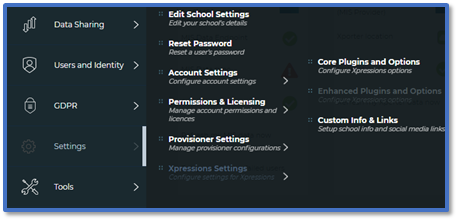
In Manage, go to Settings > Xpressions Settings > Enhanced Plugins and Options.
-
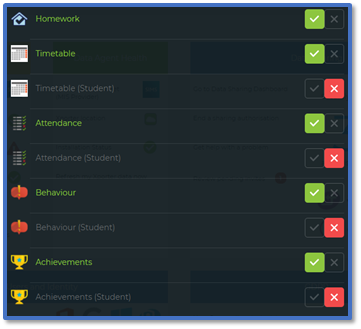
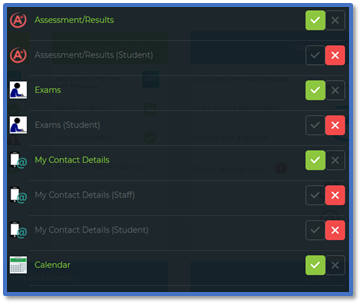
The Plugins shows all the data that can be displayed in Enhanced Xpressions for parents from SIMS. Tick the relevant data you want to show:
-
Homework: Parents can see homework that has been assigned to the student.
-
Timetable: Parents will be able to view the student’s lesson timetable for the week.
-
Attendance: Parents will be able to see the student’s entire attendance record and have a breakdown of attendance to track any patterns of absence or lateness.
-
Behaviour: Parents will see a summary of behaviour points and a full list of any behaviour incidents that had been recorded in SIMS. Any behaviour records can be expanded to view further details recorded by the school.
-
Achievements: Parents will see a summary of achievement points as well as all achievement records for the academic year so far. Any achievement records can be selected to view details in full.
-
Assessment/Results: This displays upcoming assessments that are stored for students in SIMS. Any assessments you choose to share will be shown in full.
-
Exams: Parents can view upcoming exam information in the app and the website.
-
My Contact Details: Parents can see their own contact details as saved within the school’s SIMS.
-
Calendar: Parents can see a list of events and the dates they will take place on.
-
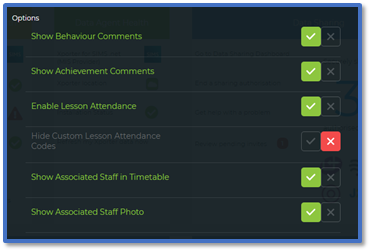
For Options, tick any of the extra features you want to show.
-
Show Behaviour Comments: Additional comments that teachers have added to behaviour records in SIMS.
-
Show Achievement Comments: Additional comments that teachers had added to achievement records in SIMS.
-
Enable Lesson Attendance: Display lesson attendance marks (not registration class) in the app.
-
Hide Custom Lesson Attendance Codes: The inclusion of lesson attendance marks made custom for the school rather than the default one.
-
Show Associated Staff in Timetable: Parents can see the names of teachers that the student is linked to in SIMS e.g., the student’s class teachers, head of year etc.
-
Show Associated Staff Photo: Parents can see staff photos from SIMS displayed.
-
Click Submit.


