Scope
Steps to forward a parent’s reply in Incoming.
Instructions
-
Go to Incoming > select the relevant reply.
-
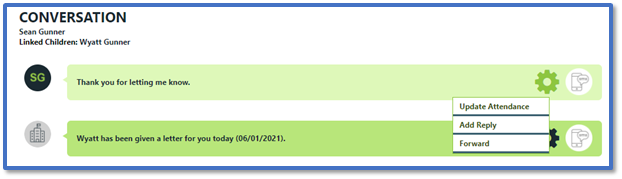
In the Conversation thread, click on the reply’s cogwheel icon.
-
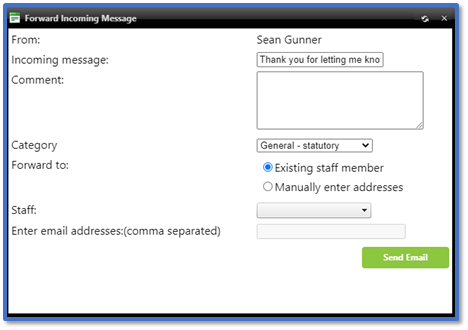
Select Forward to open the Forward Incoming Message window.
-
In Comment, include additional information regarding the reply or contact for your intended recipient.
-
You can Forward to either an Existing staff member or Manually enter addresses:
-
Existing staff member: Select the Staff drop-down menu and tick the staff members that you want to forward the message to. Only staff members with a Work Email in Messenger will appear in this list.
-
Manually enter address: Enter the staff member’s email address in Enter email addresses. If sending to more than one email address, separate them using spaces.
-
Click Send Email.


