Scope
Steps to change year/reg groups for contacts in Upload Data.
Instructions
-
Open the spreadsheet that you previously uploaded with your imported contacts.
-
Add a minus sign in front of the Group-Reg and/or Group-Year column headings > Save.
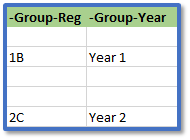
-
Go to Tools > Contacts > Upload Data.
-
Click Browse > select the file > Upload.
-
This will have updated the previously imported students by removing them from their Reg and/or Year groups in Messenger.
-
Return to the spreadsheet and remove the minus sign from Group-Reg and/or Group-Year.
-
Update the year groups and registration groups for all the relevant contacts > Save.
-
In Upload Data, click Browse > select the file > Upload.
-
This will have updated the previously imported students by moving them into their new Reg and/or Year groups in Messenger.


