Scope
Steps to update attendance in your MIS from Messenger.
Instructions
-
Go to Incoming > select the relevant reply.
-
In the Conversation thread, click on the reply’s cogwheel icon.
-
Select Update Attendance.
-
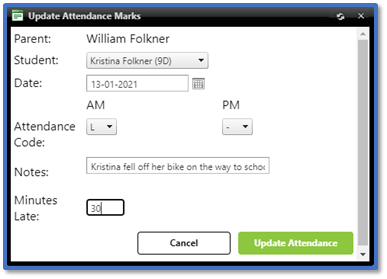
In the Update Attendance Marks window, select the required Attendance Code in the AM or PM drop-down menus.
-
In Minutes Late, enter by how long the student was late if applicable.
-
Click Update Attendance.
- The Attendance Codes and Notes will be added into your MIS.
- Note: This feature is only available for schools using SIMS, Facility CMIS, Progresso, and SEEMiS.


