Scope
Steps to resend a message from History.
Instructions
-
Go to History.
-
Select the relevant message to open the Message Details. Read our guide for further information: Messenger: Check Message History.
-
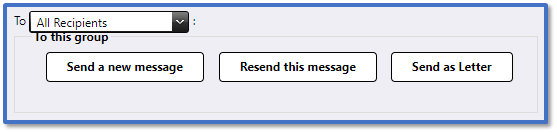
In the drop-down above To this group, select one of the following:
-
All Recipients: This will send the message to all the original recipients.
-
Filtered: This will send the message to contacts based on how you have filtered them in the table above e.g. only sending to the ones where the original message had failed.
-
Not responded: This will only send the message to contacts who have not replied.
-
In To this group, select one of the following options:
-
Send a new message: This directs you to Advanced Messaging with the same recipients, message route and contents pre-populated so that you can make any necessary changes before sending it again.
-
Resend this message: This resends the message directly with the exact same message and contacts.
-
Send as Letter: This directs you to Advanced Messaging to reformat the same message into a letter. Read our guide for further information: Messenger: Creating Letters.


